
What if you could reclaim a full workday every single week — without working harder, hiring a virtual assistant, or overhauling your business systems?
That’s exactly what happened to one Forbes contributor after she tested ChatGPT’s quietly powerful new feature: Apps in ChatGPT. The result? A staggering 8 to 9 hours saved per week — time she redirected into high-value work, uncovering dormant business opportunities, and generating new revenue.
This isn’t hype. This is AI finally doing what it promised — acting as a true professional assistant that integrates directly into your existing workflow. And the best part? You don’t need to be a tech expert to set it up.
In this article, we’ll break down exactly what ChatGPT’s Apps feature is, how it works, the precise prompts that drive real results, and how you can use it to upgrade your career and make more money — starting this week.
What Is ChatGPT’s “Apps in ChatGPT” Feature?
Quietly rolled out by OpenAI in October 2025, the “Apps in ChatGPT” feature is one of the most underreported upgrades in the history of the platform. While most attention has gone to new model updates and voice features, this integration quietly turned ChatGPT into something far more powerful: a personalised AI executive assistant that reads your emails, reviews your calendar, analyses your financials, and tells you what matters most — in real time.
The feature allows ChatGPT to directly connect with over 105 productivity and lifestyle apps, including:
Productivity & Work Tools:
 Microsoft Outlook & Calendar
 Google Workspace (Gmail, Google Calendar, Google Drive)
 Slack & Microsoft Teams
 Asana and Monday.com (project management)
 Stripe (payments and financial data)
 Canva, Adobe Photoshop & Creative Cloud
 Figma
Figma
Lifestyle & Learning Apps (newly added):
- TripAdvisor, Uber, Khan Academy, Peloton
And this is just the beginning — OpenAI continues to expand the integrations list. Previously, Coursera’s integration was highlighted for its ability to help professionals identify and upskill in the most in-demand competencies for the future of work — a powerful career-upgrade tool in its own right.
The Real-World Test: How 9 Hours a Week Were Saved
Rachel Wells, a Forbes contributor, freelance journalist, and multi-business entrepreneur, put this feature to the test. Her daily reality before the integration was one many professionals will recognise: 1.5 to 2 hours per day lost to email triage, calendar prep, client follow-up, and inbox management — often while still missing important messages and opportunities buried in the flood.
After connecting her Microsoft Outlook email and calendar to ChatGPT, the same tasks now take her just 30 to 45 minutes — a reduction of over 60% in time spent on routine communications work.
That’s not a marginal improvement. That’s the equivalent of recovering one full working day per week.
Her verdict: “With AI tools and smart workflow and app integrations, it’s easy to see how the four-day work week can become more of a reality.” Source
Step-by-Step: How to Set Up Apps in ChatGPT (Plus Plan)
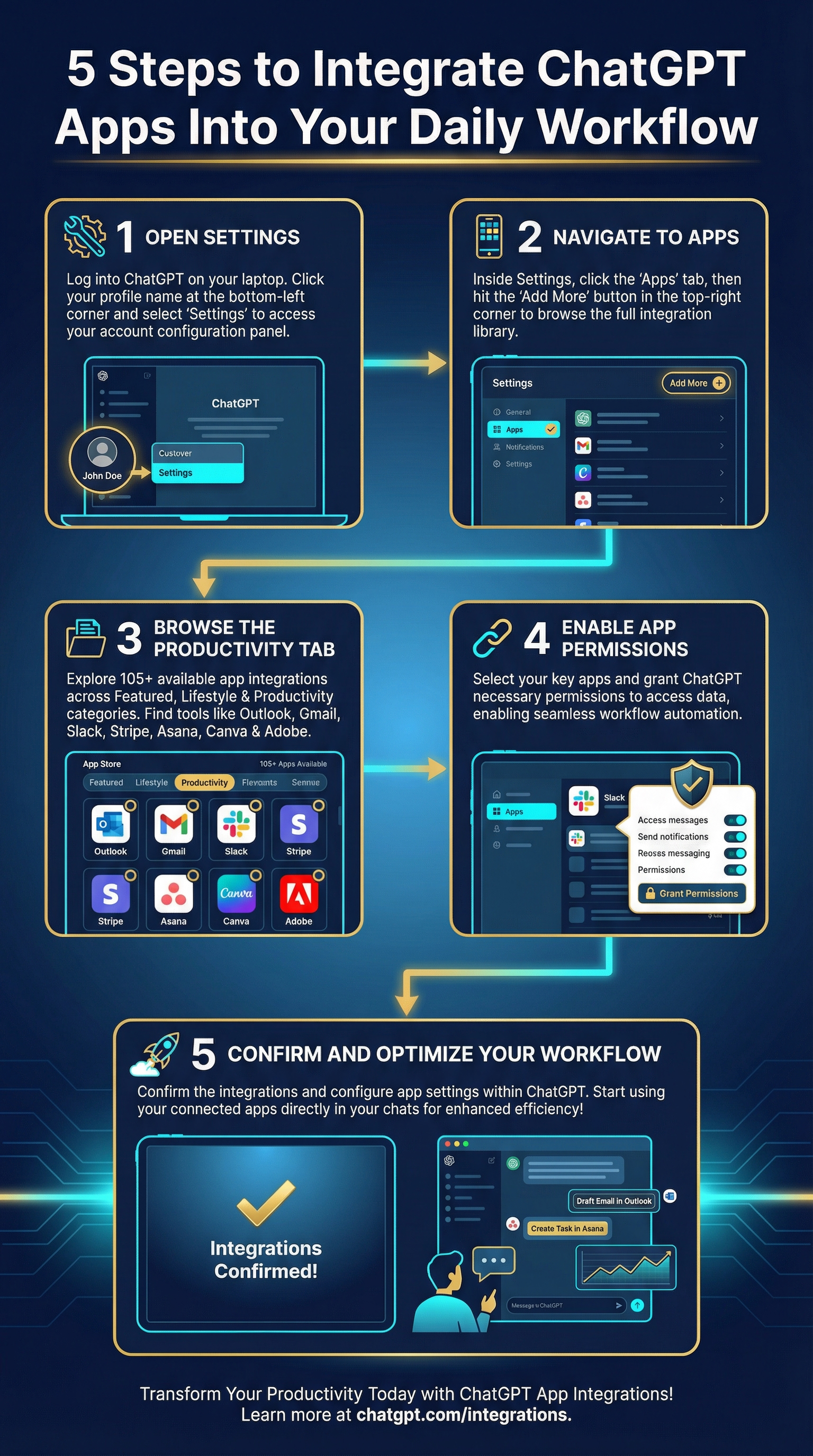
Setting up the integration is straightforward. Here’s a clean walkthrough:
Step 1: Open Settings Log into ChatGPT on your laptop, click your name in the lower-left corner, and select “Settings.”
Step 2: Navigate to Apps In the settings pop-up, click “Apps”, then select “Add More” in the top right corner.
Step 3: Browse the Productivity Tab Three category tabs will appear: Featured, Lifestyle, and Productivity. Click “Productivity” to browse over 105 available app integrations — from email and calendar tools to project management, creative software, and financial platforms.
Step 4: Enable App Permissions Select the apps you want to connect (e.g., Outlook, Gmail, Stripe, Slack) and grant the necessary permissions for ChatGPT to read and analyse your data.
Important: Before connecting your apps, go to Settings → Data Controls and turn off “Improve the model for everyone” to protect your data privacy. If you’re using a ChatGPT Enterprise plan, seek IT department approval first.
Step 5: Start Chatting with Your Apps Once integrated, simply open a new chat, reference the app by name, and start prompting. ChatGPT will access your live data and respond with intelligent, context-aware outputs.
The Power Prompts: Exactly What to Ask ChatGPT
This is where it gets exciting. The right prompts unlock the full value of the integration. Here are the real prompts tested and proven to deliver results:
 Prompt 1: Weekly Meetings Overview
“What 1:1 meetings do I have this week?”
ChatGPT returns dates, times, meeting briefs, and clickable links — all pulled directly from your calendar. No more scrambling through apps.
Prompt 2: Client Meeting Prep (Replaces Hours of Manual Prep)
“Provide a summary of my correspondence with [client name] so far, so I can prep for this meeting. Also provide an overview of her last email to me.”
The output includes: a full correspondence timeline, bullet-point key details, strategic context, smart talking points, questions you need to ask, and the questions the client is likely to raise. This single prompt effectively replaces what would typically require 45 minutes to an hour of manual review.
 Prompt 3: Urgent Follow-Up Identifier
“Look through my email. Are there any PR emails I’ve already initiated conversations with that I’ve missed and haven’t replied to in the last two weeks? Also, have I responded to [name] from [company]?”
This prompt acts as an instant email audit — identifying missed opportunities, pending follow-ups, and critical actions in under 10 seconds. ChatGPT even generates a priority list for your day at the end of the response.
Prompt 4: Stripe Revenue Dashboard (For Business Owners & Freelancers)
“Create a spreadsheet of my sales data for Q1 2026, turning it into a revenue dashboard while eliminating payment IDs.”
Using ChatGPT’s Thinking mode with Stripe connected, the result was a fully formatted Excel spreadsheet complete with a dashboard overview tab, sales detail tab, and notes tab — looking as though it was built by an accounting professional. Time taken: under 13 minutes. Time it would typically take manually: 2+ hours.
The “Million-Dollar Prompt”: How to Use ChatGPT to Make More Money
Perhaps the most powerful application of the Apps integration isn’t about saving time — it’s about generating new revenue from opportunities you didn’t even know you had.
This prompt, used with your email inbox connected, scans your existing correspondence and surfaces dormant business opportunities:
“What are some dormant business opportunities from credible organisations and corporations, for revenue-generating partnerships that could be lying in my inbox, ready to tap into and explore?”
For entrepreneurs, freelancers, coaches, consultants, and content creators, this single prompt can surface high-value leads, untapped partnerships, and missed collaborations hidden within months of emails. It doesn’t just save time — it converts saved time into new income streams.
This is the compounding power of AI: you save hours in administration, and you reinvest those hours into higher-value, revenue-generating activities — guided by AI insights you would never have had otherwise.
How to Use ChatGPT Apps to Upgrade Your Career
Beyond saving time and boosting income, the Apps integration is a genuine career acceleration tool. Here’s how professionals across industries can leverage it:
For Corporate Professionals & Managers: Use the calendar and email integration to walk into every meeting fully briefed, every stakeholder interaction prepared, and every deadline tracked — with AI acting as your behind-the-scenes chief of staff.
For Freelancers & Independent Consultants: Connect Stripe to analyse your revenue patterns. Connect your calendar to identify underutilised time blocks and prompt ChatGPT for high-impact activities to maximise your hours and generate more profits.
For Side Hustlers & Entrepreneurs: Use the inbox opportunity scan to uncover business opportunities you’ve missed. Use the Coursera integration to identify skill gaps and upskill strategically — positioning yourself for better-paying projects and roles.
The Bigger Picture: Those who master AI tools like this don’t just work more efficiently — they make themselves demonstrably more valuable in the marketplace. In a world where employers and clients are actively seeking AI-proficient professionals, the ability to leverage ChatGPT’s Apps integration is not just a productivity hack. It is a career differentiator.
Limitations to Be Aware Of
No tool is perfect, and transparency matters. As of the current rollout, there are a few limitations worth knowing:
 You cannot send emails directly through ChatGPT — it reads and analyses only
- You cannot accept calendar invites directly within the interface
- Stripe timestamp data is not yet fully supported (partial financial data only)
These are expected to be resolved in future updates. The feature is still rolling out and evolving rapidly — which means the best is genuinely yet to come.
Why This Matters Now: The 2026 AI Productivity Shift
We are living through one of the most significant shifts in professional productivity in history. The professionals and businesses who learn to integrate AI tools into their daily workflows today are not just becoming more efficient — they are compounding advantages that will be increasingly difficult for late adopters to close.
The ChatGPT Apps integration is a textbook example of this shift. A feature that was barely covered in major tech media has already enabled at least one professional to reclaim a full workday each week, uncover dormant revenue opportunities, and walk into every client meeting as the most prepared person in the room.
The question is no longer whether AI will transform professional work. The question is whether you will be the one using it — or competing against those who are.
Ready to Master AI Tools Like This? Aipro Institute Can Help.
At Aipro Institute, our entire mission is built around three words: Learn AI. Apply AI. Monetise AI.
We don’t offer a single course that becomes outdated in six months. We offer a living, evolving membership — monthly live AI lessons, access to AI-powered apps, a curated resource library, and a community of professionals and entrepreneurs all applying AI in the real world.
Our 6 Pillars of AI Learning — including Advanced Prompting, Workflow & Automation, High-Impact Content, and Branding & Marketing — are designed to give you exactly the skills needed to leverage powerful features like ChatGPT’s App integration at a professional level.
For just $199/year (less than a coffee a day), you get:
 Monthly live AI lessons with industry experts
- Access to AiPro Monetise™, AiPro SEO™, AiPro Studio™ apps
- Hundreds of pre-built, high-level AI prompts
- A community of AI practitioners sharing real-world results
- Regular updates on the tools, workflows, and strategies that actually work
The professionals winning in 2026 are not working harder. They are working with better tools — and they know how to use them.
 Start Your AI Journey at Aipro Institute →
Conclusion: 9 Hours a Week Is Just the Beginning
ChatGPT’s Apps integration is not a gimmick. It is a practical, tested, and proven productivity engine that connects your most-used professional tools into a single intelligent interface. For the first time, AI is not just answering questions — it is reading your inbox, reviewing your calendar, analysing your financials, and proactively surfacing the opportunities and actions that matter most.
The professionals who embrace this now will not just save time. They will make better decisions, serve their clients more effectively, build stronger professional reputations, and generate more income — all from the same hours they were already working.
Nine hours a week. That’s 468 hours a year. What will you do with yours?
Want to learn how to apply AI tools like ChatGPT’s Apps integration to your career, business, or side hustle? Explore the Aipro Institute membership — your community for continuous AI learning and real-world application.